






Launching tomorrow on Product HuntGet the reminder

Every criterion is decided by:code, AI, an accessibility expert and a QA lead

Accessibility proof your buyers accept.

Agents test your web apps, mobile apps and documents. Experts validate every call. You get approved fixes and a signed ITI VPAT® that procurement can verify, row by row.

Evaluated against

  • W3C WCAG
  • Information Technology Industry Council (ITI) VPAT
  • PDF Association PDF/UA
  • Section508.gov
  • European Union EN 301 549
The report

One audit. Read under any law.

Every row decided and explained.

  • A level for every row

    Supports, Partially Supports or Does Not Support, with a remark and the page it points to.

  • One audit, every law

    Switch law and the clauses change. The evidence behind each row does not.

  • Compared with the last revision

    See what moved up or down since revision 1.

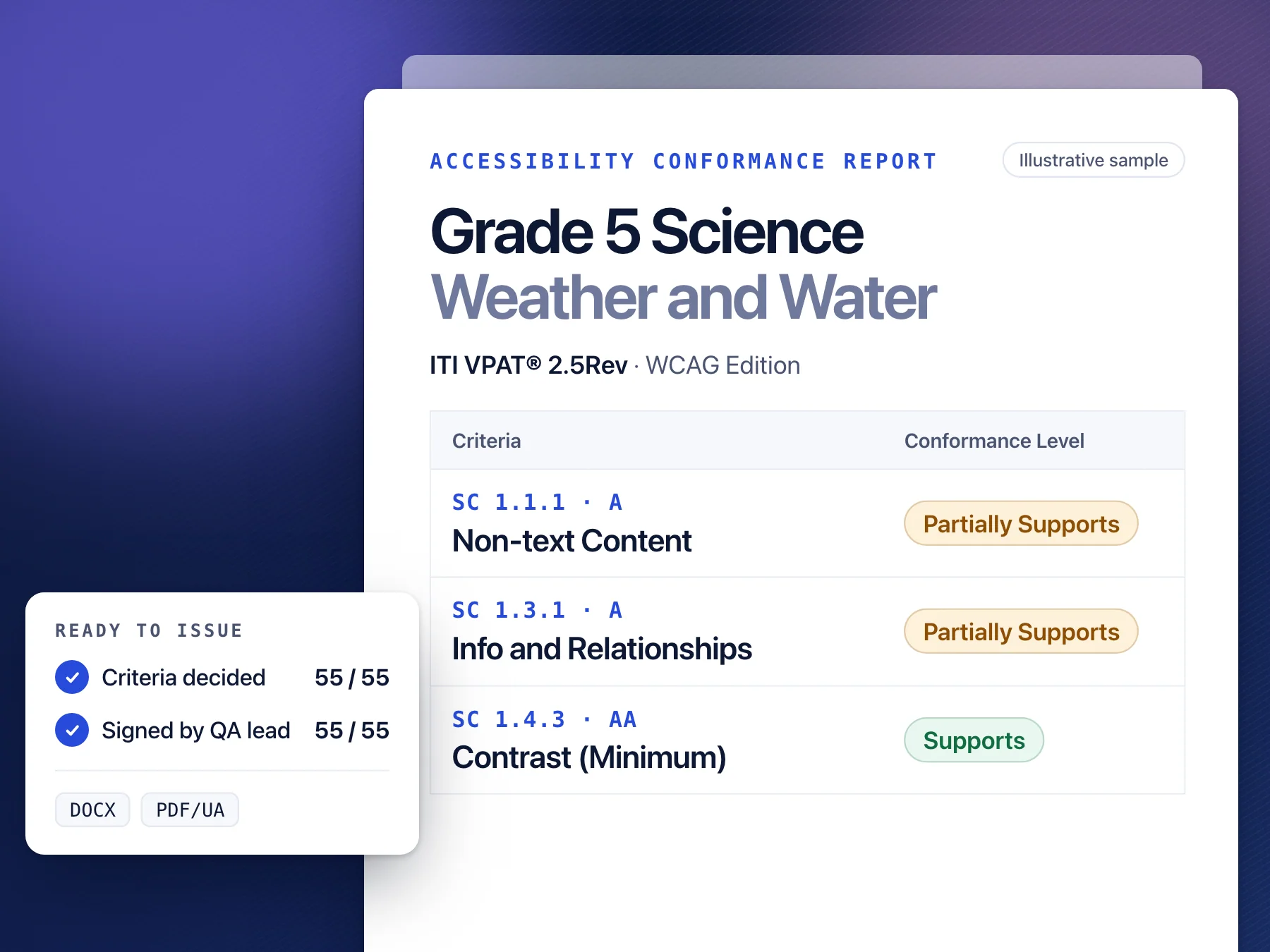
Illustrative Accessibility Conformance Report for a Grade 5 science PDF. Each success criterion has a conformance level, a short remark and a record of who decided it. Switching the law changes the clause numbers and the number of criteria in scope; the evidence stays the same.

Grade 5 Science · Weather and Water

Illustrative sample

Who it's for

For teams who get asked for proof.

Every RFP, security review and public-sector policy ends with the same request: the conformance report. Here is what changes with KaDeep.

  • Software and SaaS vendors

    The ask: “Procurement needs your ACR before legal will sign.”

    Before: The deal waits on a document

    With KaDeep: The ACR is ready when procurement asks

    • Before: Consultant audit, weeks out, priced per pageWith KaDeep: Web, mobile, help center and PDFs in one evaluation
    • Before: Hand-drafted VPAT that buyers stop trustingWith KaDeep: ITI VPAT® 2.5 in the WCAG, 508, EU or INT edition the buyer names
    • Before: Each release makes last year's report staleWith KaDeep: Re-tested and re-issued on every major release
    • WCAG 2.2 AA
    • Section 508
    • EN 301 549
    See the sample report
  • Public sector and regulated enterprises

    The ask: “Every document we publish must meet WCAG 2.1 AA.”

    Before: Volume outruns the audit team

    With KaDeep: Every file checked, every decision recorded

    • Before: Notices published faster than anyone can checkWith KaDeep: One audit read under ADA Title II, Section 508 or EN 301 549
    • Before: Findings in spreadsheets, not tied to elementsWith KaDeep: An evidence pack with a SHA-256 manifest for every file
    • Before: No defensible record if a complaint arrivesWith KaDeep: Fixed by your team, ours or on your premises, then re-tested
    • ADA Title II
    • Section 508
    • WCAG 2.1 AA
    See the sample report
  • Publishers and EdTech

    The ask: “Send the VPAT for every title on the adoption list.”

    Before: One title at a time, by hand

    With KaDeep: A verifiable ACR for every title

    • Before: Tag trees checked page by page in AcrobatWith KaDeep: Tagged PDF, EPUB and Office files checked to PDF/UA and EPUB A11y 1.1
    • Before: Math, figures and tables guessed or skippedWith KaDeep: Math, figures and tables judged by an expert, never guessed
    • Before: Reviewers question remarks they can't verifyWith KaDeep: Every remark tied to a page and structure element a reviewer can check
    • WCAG 2.2 AA
    • PDF/UA-1
    • EPUB A11y 1.1
    See the sample report
What we evaluate

Everything you ship, against the standard that applies.

One platform covers the surfaces your customers use and the standards your buyers cite. Documents get the deepest inspection, down to the tag tree.

Surfaces

6
  • Documents

    Tagged PDF, Word, PowerPoint, Excel, EPUB, InDesign

  • Web apps and sites

    Pages, states and flows

  • iOS and Android apps

    Native screens and flows

  • Desktop apps

    Windows and macOS

  • Video and audio

    Captions, transcripts, description

  • SCORM courses

    E-learning packages

Standards

6

By jurisdiction

  • WCAG 2.2 A and AA

    The international baseline

    Global
  • Section 508

    36 CFR 1194, E205.4

    US federal
  • ADA Title II

    28 CFR 35.200, WCAG 2.1 AA

    US state and local
  • EN 301 549 and EAA

    v3.2.1, Directive (EU) 2019/882

    European Union

By file format

  • PDF/UA-1

    ISO 14289-1, validated with veraPDF

    Tagged PDF
  • EPUB Accessibility 1.1

    Ebooks and digital textbooks

    EPUB

Also read under

  • AODA
  • IS 17802
  • BITV 2.0
  • RGAA 4.1
  • UK PSBAR
  • Accessible Canada Act
  • JIS X 8341-3
  • and more
How it works

Agents gather the evidence. Experts make the calls.

Every criterion follows the same path, so every row in your report can say who decided it and how. Shown here on a tagged PDF, our deepest pipeline.

  1. Test the structure, not just the surface

    KaDeep reads the tag tree, reading order, fonts, links and artifacts of every page, validates PDF/UA with veraPDF, and models what a screen reader would announce. Every finding is tied to a structure element.

    deterministic checks
    0
    Same file, same result.
    WCAG 2.2 A and AA criteria
    0
    Read under Section 508 or ADA Title II.
  2. Judge what code cannot, in two passes

    Eleven narrow AI tasks assess alt-text quality, reading order, table semantics, link purpose, colour use and spoken math. Each runs twice, in shuffled order, and every answer is validated against the page.

    narrow AI tasks
    0
    Alt text, order, tables, links, color, math.
    independent passes each
    0
    Shuffled order, checked against the page.
  3. An accessibility expert validates every call

    Every fail, every disagreement between passes and every pass on the nine high-risk criteria goes to a reviewer, with the element outlined, its tags and the screen-reader transcript side by side.

    high-risk criteria, always reviewed
    0
    A person confirms every pass, not only fails.
    rows decided by AI alone
    0
    AI never sets a row to Supports by itself.
  4. AI recommends the fix. An expert approves it.

    Each finding comes with a recommended fix. A KaDeep expert, or one you appoint, approves it before remediation. KaDeep then re-runs every check on the new revision and shows what is fixed, still open or new.

    check re-run on each revision
    Every
    No second audit to book.
    states: Fixed, Still open, New
    0
    What closed, what is left, what is new.
  5. A QA lead signs every row

    A second expert, never the reviewer, approves each of the 55 rows. They can make a level stricter, never better. If a finding changes later, its approval goes stale.

    people on every row
    0
    Reviewer and approver are never the same person.
    rows approved before export
    0 / 55
    Issued on the ITI VPAT® 2.5Rev template.
Deliverables

What you hand to procurement, legal and your auditors.

Three deliverables, all generated from the same run, so every number in the report traces back to evidence.

  • Sample accessibility conformance report for a Grade 5 science PDF: a table of WCAG success criteria with conformance levels and remarks, and a card showing 55 of 55 criteria decided and signed by a QA lead.

    For Procurement

    VPAT® and ACR

    The official ITI VPAT® 2.5Rev template, filled in place, in the WCAG, Section 508, EU or INT edition. Every remark says what was found and where.

    Answers

    “Does this vendor meet our accessibility requirements?”

    • DOCX
    • PDF/UA
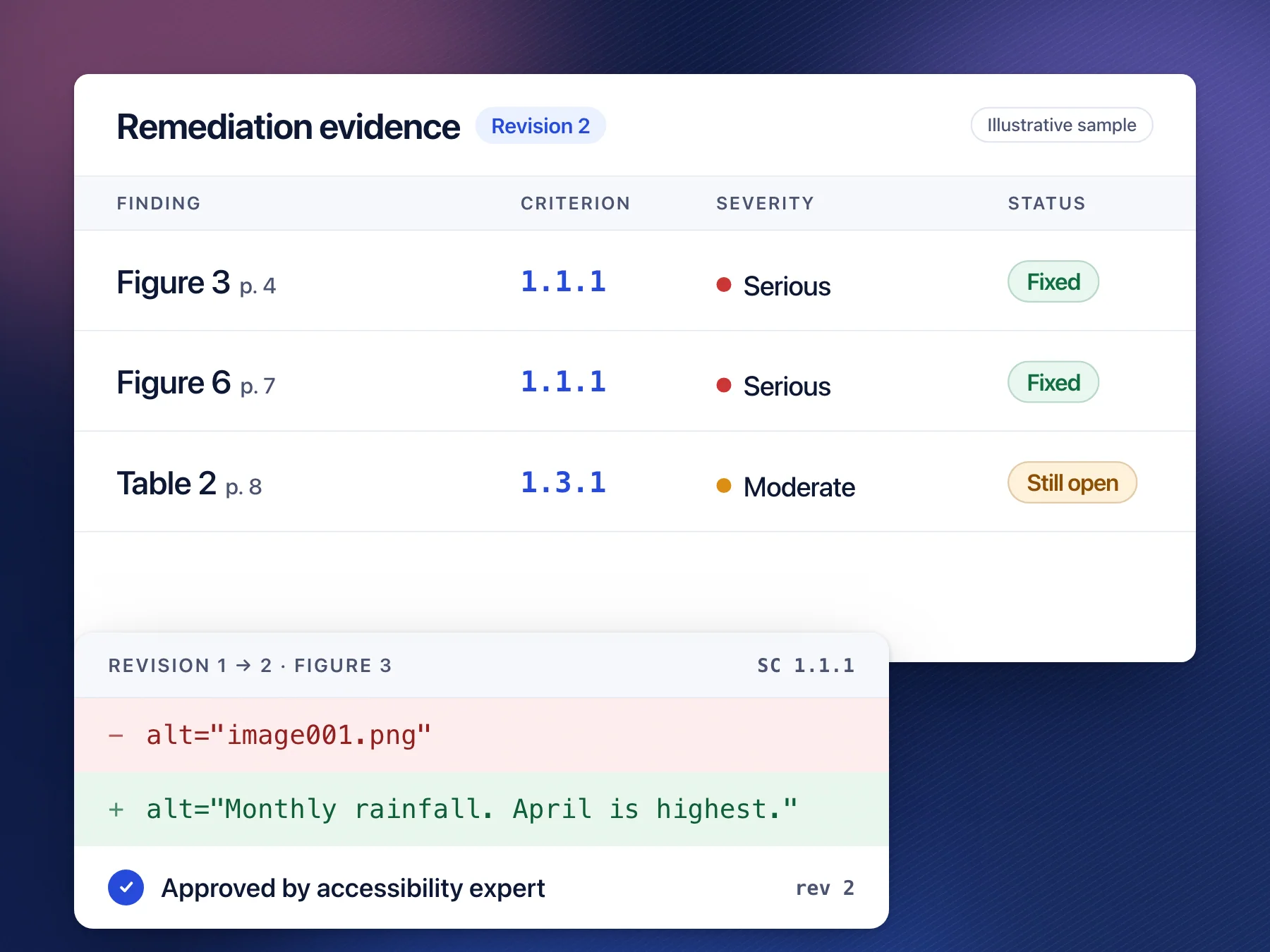
  • Sample remediation log listing page, element, criterion, severity and status for three findings, with a revision diff of an image's alt text and the line Approved by accessibility expert.

    For Engineering and content teams

    Remediation evidence

    Every finding with its page, element, criterion, severity, approved fix and who approved it, plus the revision diff that proves it was fixed.

    Answers

    “What was wrong, who approved the fix, and did it work?”

    • HTML
    • CSV
    • XLSX
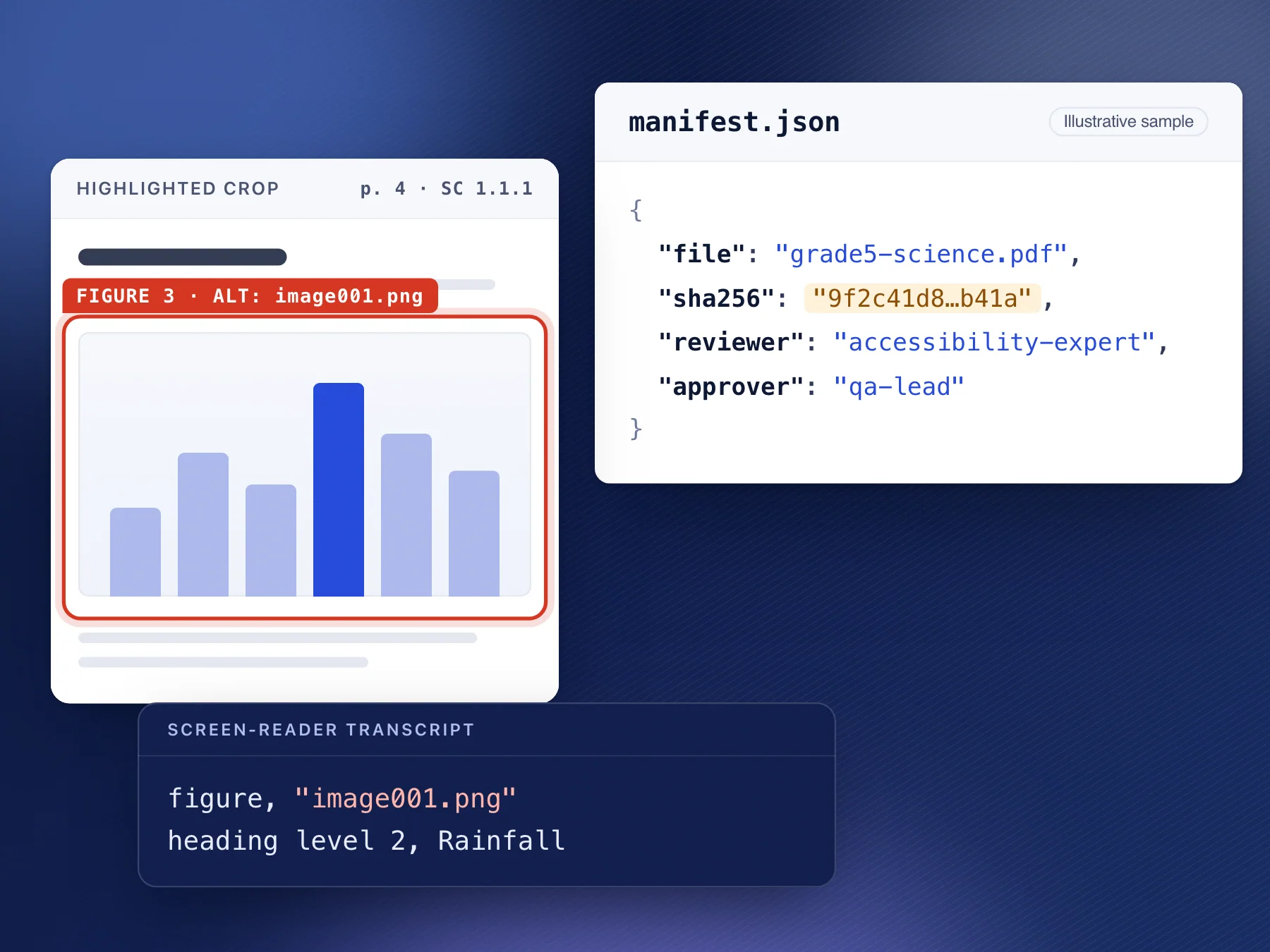
  • Sample evidence pack: a highlighted crop of a figure on page 4, a manifest.json file with the evaluated file's SHA-256 hash, and a screen-reader transcript.

    For Legal and auditors

    Audit documentation

    Highlighted crops, screen-reader transcripts, validator reports, tool versions and reviewer records, bound to the hash of the file evaluated.

    Answers

    “Can we show exactly what was evaluated, and by whom?”

    • ZIP
    • MANIFEST.json

Covers show illustrative sample documents built from the example report above.

What a KaDeep report will never do

  • Count an AI pass as a pass before a person confirms it
  • Mark Supports without a confirmed pass on every applicable instance
  • Leave an A or AA criterion Not Evaluated
  • Say “fully accessible” or “100% compliant”
Questions

What buyers ask before they sign.

Straight answers, including where a person is still needed.

No. Code decides what rules can decide, AI drafts and flags what needs judgement, and an accessibility expert confirms every AI result. A QA lead, who is never the reviewer, then approves each row. An AI pass on its own never makes a row read Supports.

Bring one product. Leave with the report it would earn.

In 30 minutes we test a page, app screen or document you choose, walk through the expert review, and show you the ACR it produces.

VPAT® is a registered service mark of the Information Technology Industry Council (ITI).